Bynarize HRMS for Android: attendance, leave and approvals on your phone
The Bynarize HRMS app is available on Google Play for Android. Employees check in for their shift, see their attendance month, apply leave, open payslips and check holidays. Managers approve leave, comp-off, regularization and overtime from the same app, using the same account as the web.
- Platform
- Android phones and tablets
- Sign-in
- Your company’s Bynarize HRMS account
- Price
- Free to download from Google Play
What can employees do in the Bynarize HRMS app?
Real screens from the app, shown with sample data. The app is listed on Google Play as Bynarize HR.
- 01
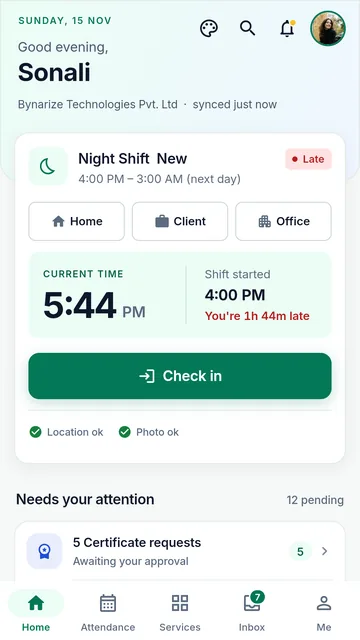
Check in from Home, Client or Office
Today’s shift, the current time against shift start, and one Check in button. Location and photo checks show green before you punch.
 02
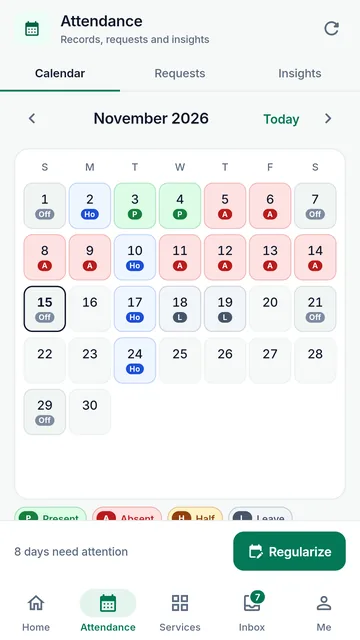
Your attendance month at a glance
Present, absent, half day, leave, holiday and week-off on one calendar. Days that need attention go straight to Regularize.
 03
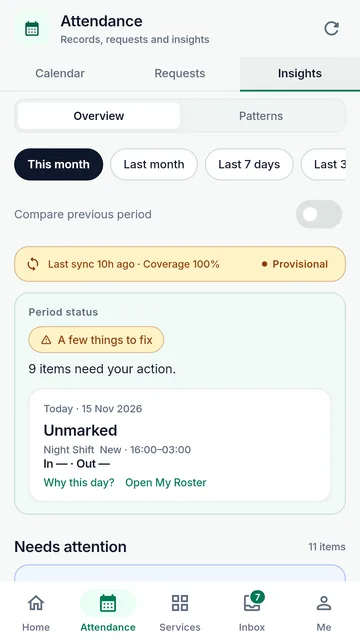
See what needs fixing before payroll
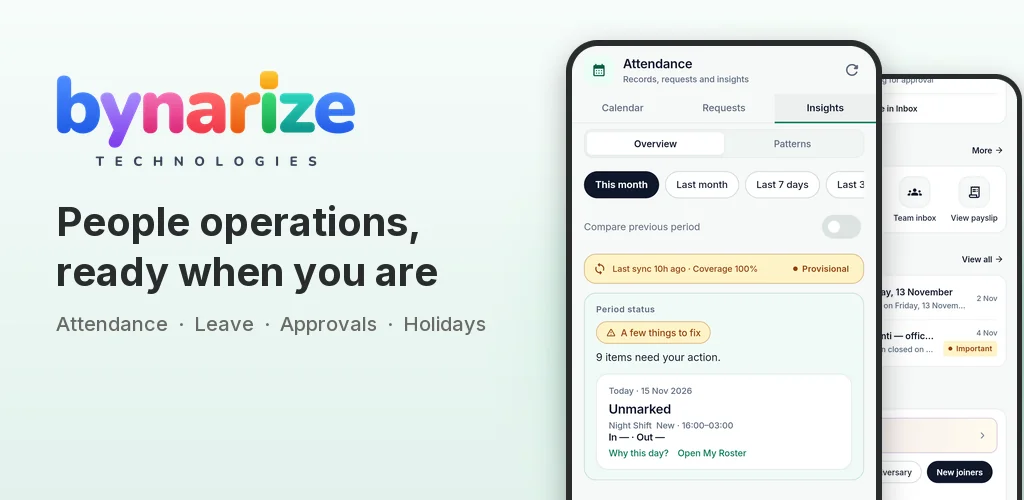
Insights flag unmarked days and missed punches for this month, last month or the last 7 days, with a link to your roster.
- 04
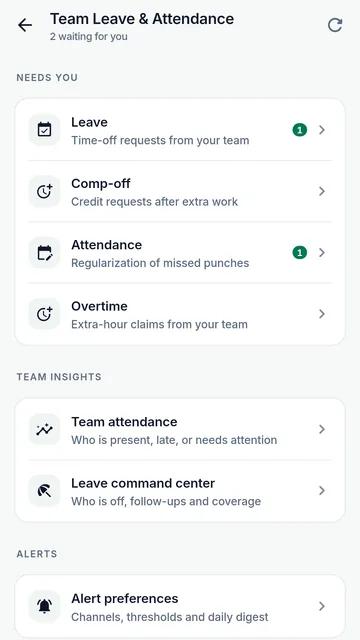
Managers approve on the move
Leave, comp-off, attendance regularization and overtime requests from your team, plus who is present, late or off today.
 05
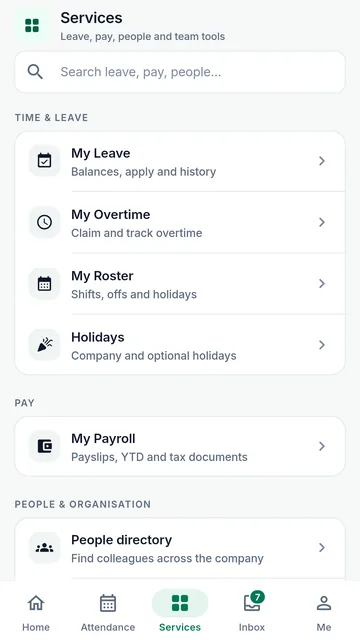
Leave, payslips and people in one list
My Leave, My Overtime, My Roster, Holidays, My Payroll with payslips and tax documents, and the people directory.
 06
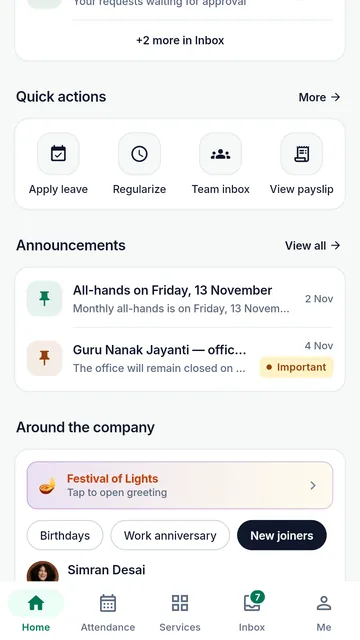
Company news, birthdays and new joiners
Quick actions to apply leave, regularize or view a payslip, followed by announcements and what is happening around the company.
 07
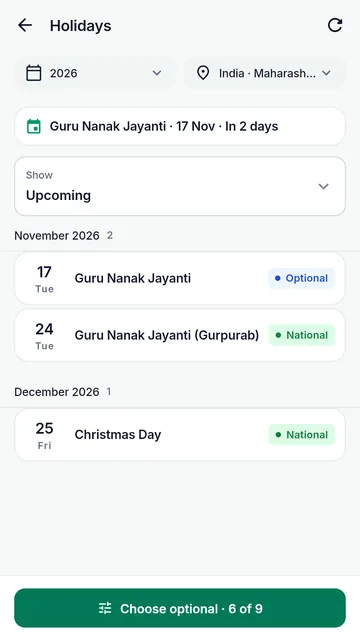
Holidays for your state, optional ones included
National and optional holidays by year and location. Employees pick their optional holidays in the app, within the quota HR sets.
What is on each tab of the app?
Five tabs along the bottom. The same records drive the web application, so a leave applied on the phone shows up for HR on the web.
Want the detail behind each area? See attendance, leave and comp-off, pending approvals and Payroll Lite.
| Tab | What it holds |
|---|---|
| Home | Shift card and check-in, items that need your attention, quick actions, announcements, birthdays and new joiners. |
| Attendance | Monthly calendar, your attendance requests, and insights on unmarked days and patterns. |
| Services | Leave balances and applications, overtime claims, roster, holidays, payslips and tax documents, people directory. |
| Inbox | Everything waiting on you: approvals for managers, status updates on your own requests. |
| Me | Your profile and account settings. |
How do employees start using the app?
Four steps, using the work account your organization gave you.
- 1
Install the app
Open Google Play on your Android phone and install Bynarize HR by Bynarize Technologies. The package name is com.bynarize.hrms.
- 2
Sign in with your company account
Use the same sign-in you use for Bynarize HRMS on the web. Your HR team creates the account; there is no separate app registration.
- 3
Allow location and camera if asked
If your company uses location or photo checks for attendance, the app asks for these permissions the first time you check in.
- 4
Check in and apply leave
Your shift and leave balances are already there. Check in from Home and apply leave from Services or the quick actions.
Bynarize HRMS app: questions people ask
Does Bynarize HRMS have a mobile app?
Yes. Bynarize HRMS has an Android app on Google Play, listed as Bynarize HR (package com.bynarize.hrms). Employees use it to check in, view attendance, apply leave, see payslips and holidays, and managers use it to approve team requests.
Who can sign in to the Bynarize HRMS app?
Employees of a company that uses Bynarize HRMS. They sign in with the same account they use on the web; HR creates it. The app is not a standalone product for individuals.
Does the app cost extra?
The app is free to download from Google Play. Signing in needs an account from an employer that uses Bynarize HRMS (Starter ₹45, Professional ₹85 or Enterprise ₹130 per employee per month, with a 1-month free trial). Which features appear depends on how your organization has set up Bynarize HRMS.
Can employees mark attendance from the app?
Yes. The Home screen shows today’s shift and a Check in button, with a choice of Home, Client or Office as the work location. Where the company turns on location or photo checks, the app confirms both before the punch is recorded.
Can managers approve leave from their phone?
Yes. Team Leave & Attendance lists pending leave, comp-off, attendance regularization and overtime requests, and shows who on the team is present, late or off. Which approvals appear depends on your role and your company’s setup.
Can I see my payslip in the Bynarize HRMS app?
Yes. Services > My Payroll shows payslips, year-to-date figures and tax documents once your company publishes them in Bynarize HRMS.
Is there an iPhone (iOS) app?
This page covers the Android app on Google Play. On an iPhone, employees can sign in to Bynarize HRMS from the phone’s browser at hrms.bynarize.com.
What permissions and data does the Bynarize HR app use?
The app asks for location and camera for attendance verification where your organization requires it, and for notifications about approvals and updates. Its Google Play data safety section states that no data is shared with third parties and that data is encrypted in transit.
Not on Bynarize HRMS yet?
Start a 1-month free trial on any plan. Employees sign in to the web application and the Android app with the same account.