Run your entire workforce from one platform.
Your workforce shouldn't run across 10 different systems. HR, attendance, leave, payroll, IT assets, visitors and approvals - connected through one employee record, one workflow engine and one login.
Everything from hire to exit - HR · Attendance · Leave · Payroll · IT · Visitors · Approvals
If any of these sound familiar, you're paying for them daily.
Each one quietly costs hours, money or trust - and each one is solved out of the box.
Payday Excel that never matches attendance
Payroll reads the same attendance and leave - payslips and Form 16 in self-service
Approvals stuck in inboxes
Routine ones approved automatically; the rest escalated when overdue
Fake check-ins and missed punches
Verify attendance using location, network or face - your choice
Assets tracked in stale spreadsheets
Track every asset from purchase to disposal - always know who has what
Paper visitor registers
Digital visitor flow with approvals, badges and full history
Messy exits with missed checklists
A clear exit process with automatic access removal on the last day
Important updates lost in inboxes
Reach people on email, push, Microsoft Teams or Slack
“Did they even see that announcement?”
Target the right people, track reads, and get acknowledgement when it matters
Birthdays and anniversaries living in a spreadsheet
See today and the coming week, let teammates send a wish, and remind the right people automatically
Twelve solution areas. Pick where it hurts most.
Each area is built around a business problem - not a buzzword list. Click any card for the deep dive.
Found the area that hurts most?
See it working on a real tenant - a 30-minute walkthrough focused on your team, not a generic deck.
Everything inside Bynarize
Grouped by what people use it for - not by technical names.
Secure Login
- Sign in with your company credentials, Microsoft 365 or Google
- One login for everything
- Each organisation's data is kept separate
- People only see what they're authorised to
- Stays signed in safely without interruptions
Personalised Dashboards
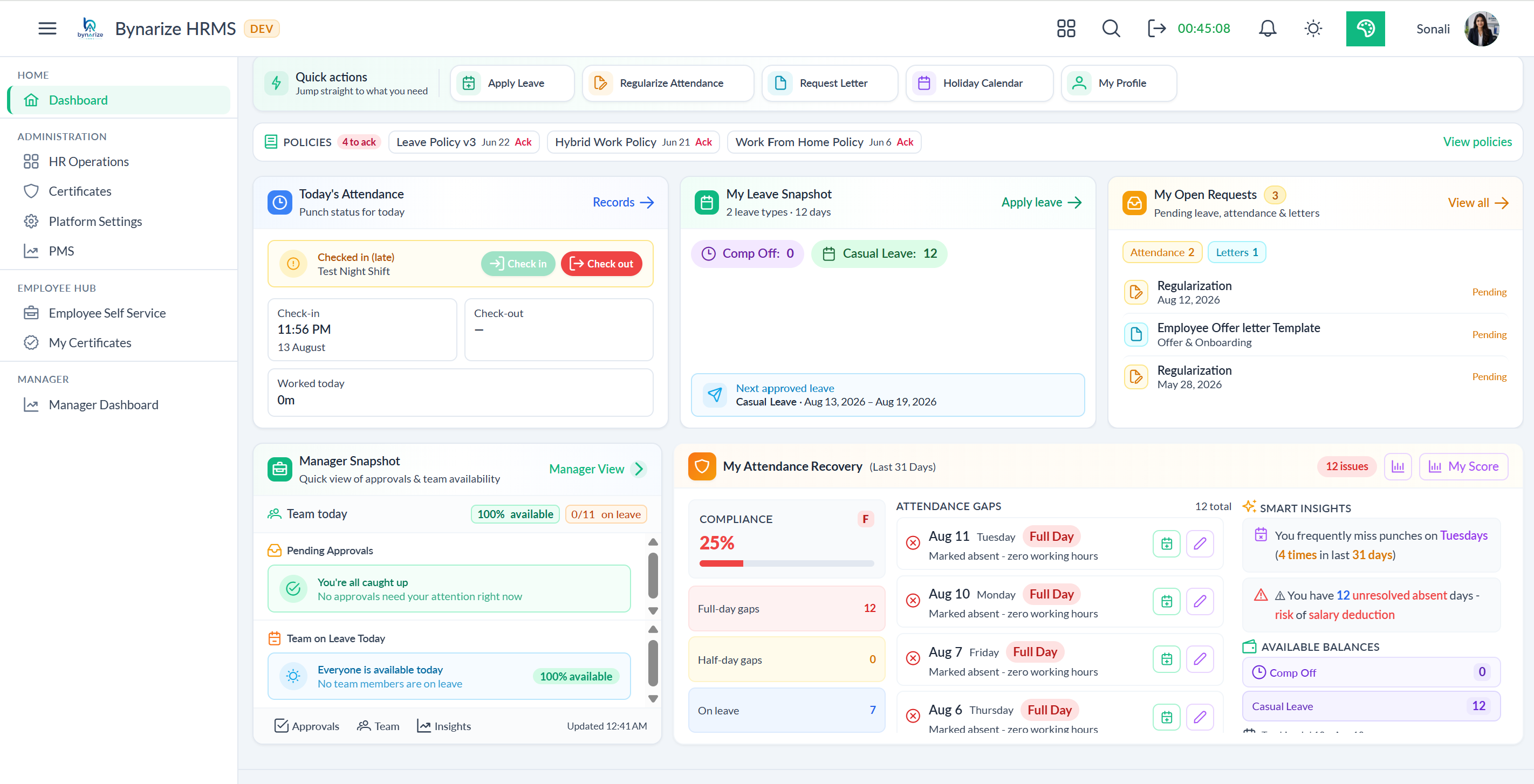
- Employee view - attendance, leave balance, holidays and quick actions
- Manager view - team overview, pending approvals, key numbers
- Admin view - organisation-wide stats and shortcuts
- Birthday and anniversary reminders
- Upcoming holidays and team leaves at a glance
Employee Management
- Searchable employee directory
- Complete profiles - personal info, job details, documents and assets
- Profile picture management
- Emergency contact and family details
- Secure document storage per employee
- Track which assets belong to which employee
- Reporting hierarchy view
Payroll - Attendance-Linked Salary, Payslips, Form 16 & Locked Runs
- Salary structures HR defines - Basic, HRA, allowances, PF, professional tax, TDS, or any pay head you add
- Each employee gets a dated salary with increment and promotion history that is never overwritten
- Pay follows attendance, approved leave, holidays and week-offs - no copy-paste into a payroll sheet
- Overtime, week-off work and holiday double-pay using the rates you promised the shop floor
- Preview one person before you run the whole company
- Exceptions surface missing salary, missing bank, LOP and overtime caps before anyone is paid
- A second person signs off. Lock is final. Last month is a record, not a file still being edited
- Payslips published to employee self-service - download this month, last year, plus year-to-date
- Form 16 Part B and annual salary statement released for tax filing
- Salary register and bank transfer file from the same locked run
Attendance - Topbar Check-In, ALRE, Tier Credits & AI Policy Generator
- Topbar one-tap Check-In drawer on every screen - live elapsed timer powered by Angular signals
- Location selector (Office / Home / Client / Other) in a single widget
- Triple-guard, per-policy: IP whitelist + multi-location geofence (Google Maps picker) + face-recognition liveness
- Auto Leave Regularisation Engine (ALRE) - 31-day gap scan with suggested leave type per gap, one-click conversion
- Attendance Credits - Bronze / Silver / Gold / Platinum tiers, streaks, credit ledger
- Smart Leave Planner heatmap - Low / Moderate / High / Critical impact per day with tier-risk warnings BEFORE applying
- AI Policy Generator - plain-English per-rule interpretation + personalised compliance warnings
- A nightly attendance sync auto-marks Absent and computes WeekOff, Holiday, Leave, Half-Day and Present for every employee
- RegularizationAutoApprove - clears the SLA backlog with full audit trail
- Today's Snapshot - who's in / late / absent / on leave with avatars + drill-down
- Team Availability Heatmap with role coverage % and Single-Point-of-Failure alerts
- Hierarchical policy engine - Employee → Band → Designation → Department → Tenant Default
- 14 extensible rule types (Grace, WorkHours, HalfDayThreshold, MaxLate, OT, Auto-Approval SLA, IP, Geofence, Face, …)
- Multi-shift master with night-shift + flexible-shift flags; per-shift grace overrides
- OrgWeekend-aware end to end - accurate for Fri/Sat regions, not just Sat/Sun
Leave Management - Smart Apply, Heatmap & Pattern Intelligence
- Smart Apply Panel - live balance, working-day count, team load score (0–10), conflicts and holiday-impact warnings BEFORE submit
- Suggested alternative dates auto-scanned ±7 days for lower team load
- Team Availability Heatmap (7/14/30 days) coloured by capacity %
- Single-Point-of-Failure alerts on critical roles + Fix-This-Day rebalance modal
- Behavioural Intelligence - sandwich, Mon/Fri, holiday-adjacent, burst, fragmentation and team-collision detection with Critical→Low severity
- 0–100 risk score per employee per pattern; daily Workforce Alert Digest emailed to every manager
- Conditional auto-approval composable with AND/OR - 30–50% of leaves clear without a human
- Dynamic approver re-resolution - pending queue re-routes instantly when reporting lines change
- Auto Leave Regularisation Engine (ALRE) - scans 31 days, suggests the right leave type per attendance gap
- OrgWeekend-aware - accurate for Fri/Sat regions, not just Sat/Sun
- Encashment liability report for finance; balance, accrual and carry-forward all run as scheduled jobs
- Multiple leave types - Casual, Sick, Earned, WFH, Short Leave, Optional Holiday, Restricted Holiday, Comp-Off
- Conversational interface - "my balance", "apply CL tomorrow", "team leaves" via chat
Comp-Off Lifecycle Automation
- Auto-credit from worked weekends and holidays (daily at 02:00 UTC), with one credit per day
- Half-day eligibility when worked ≥ 4 hours; honours OrgWeekend + OrgHoliday master
- "Use-it-or-lose-it" reminders 10 days before expiry; clean expiry with audit log
- Live policy panel for employees - expiry days, half-day eligibility, max monthly cap
- Usage report links each used credit to the leave that consumed it
- Saves a typical HR team 6–8 hours/month - zero manual ledger entry
Approval Workflows
- Set up multi-level approvals for leaves, attendance, comp-off, exits, asset requests and more
- Visual setup - easy to configure
- Different flows for different request types
- Auto-escalation when something is stuck
- See the status of any approval in real time
- Route to the right role for the right request
Shift Management
- Create multiple shifts with custom timings and breaks
- Assign shifts to employees
- Employees can see their shift details
- Safe deletion checks
- See how many people are on each shift
Organisation Structure
- Departments - create, edit and assign HR/heads
- Designations - manage job titles
- Bands and grade levels
- Map designations to departments
- Link bands to designations
Organisation Chart
- Interactive, visual chart
- Navigate the reporting structure from any employee
- Employees can see their own position
Employee Communications - Announcements, Targeting, Read Proof & Ack
- Company-wide announcements on Starter - publish once, employees see it in self-service
- Target by department, location, role or named people on Professional
- Schedule, pin, priority, attachments, draft and preview
- Read % and unread lists for leadership - not “we emailed everyone”
- Required acknowledgement for Code of Conduct, incentives and safety notes
- In-app + email notify with deep links into the employee feed
Employee Milestones - Birthdays, Work Anniversaries & Wishes
- Today’s birthdays and work anniversaries on the HR dashboard - name, department, photo, years of service
- Upcoming for today, this week or this month, so HR can plan before the day arrives
- Celebrate with your team on the employee home, with one wish per person
- Starter: see it and send wishes. Professional: automatic email and in-app note on the day or the day before
- Choose who hears it - the person, their manager, HR, or the whole company (off unless you turn it on)
- Your own wording, with name, years, department and company filled in. 29 February is still remembered
Employee Mood Pulse - Workplace Feeling, Trends & Early Alerts
- One-click how-are-you-feeling pulse - Good / Okay / Not Good, or daily Excellent / Good / OK / Not Good
- Anonymous option so people answer honestly; identity stays off HR’s individual views
- HR dashboard: Positive / Neutral / Negative mix, response rate, trend line, period comparison
- Mood by department with a privacy floor for small teams
- Reminders for non-responders and Attention Required when negative mood jumps past your threshold
- Professional and Enterprise - same capability. Not a survey, not burnout AI, not manager surveillance
Employee Surveys & Polls - Ask, Understand, Measure Engagement
- Starter polls: one question, clear choices or a scale, response rate and distribution
- Professional surveys: multi-question builder, NPS and text, templates, anonymous mode, reminders
- Ready templates for engagement, onboarding, exit, training and event feedback
- Department-safe analytics and Excel export of aggregates
- Enterprise: recurring monthly pulse, engagement score, dimension cards and trend
- My Surveys in self-service - same login as leave and payslips. Sibling to Mood Pulse, not a replacement
Employee Voice - Listen, Respond, Close the Loop
- Employees submit Suggestion, Feedback, Concern or Appreciation in under a minute
- Anonymous option - HR never sees identity on those items
- HR listening desk: New / Under Review / In Progress / Resolved with a written response
- My Feedback so people see status and what HR said next
- Mark duplicates, light analytics by type/category, resolution rate, export
- Professional and Enterprise - same capability. Not ticketing, not surveys, not Mood Pulse
Probation Tracker - Reviews, Reminders & Confirmation On Schedule
- Dashboard cards: On Probation, Review Due, Ending in 7 Days, Ending in 30 Days
- Automatic reminders at 30 / 15 / 7 days and on the due day to manager and HR
- Manager Confirm / Extend (30/60/90 days + reason) / Review Later - under a minute
- HR Action Required strip that clears when decisions land
- Employee My Probation: status, days left, completed or extended
- Professional and Enterprise - same capability. Not PMS, not ratings, not 360
Certificate Management - Control Tower, Gating, Trust & Audit Packs
- A certificate is a permission to work - not a PDF. Requirement engine scoped by role, site, project with Track / Warn / Block
- Catalog 2.0: types (licence, clearance, medical, CPD…), issuing-authority registry (~120 bodies), versions, equivalences
- ESS wallet + HR dossier: multi-file evidence, renewal chain, lifecycle states, masked numbers, audited reveals
- AI document intelligence: OCR + field extraction with per-field confidence - nothing saves until a human accepts
- Verification queue, integrity hashes, duplicate detection, seven fraud rules + AI signals. Only a human marks Verified
- Nightly expiry sweep, reminder ladders, renewal board, AI renewal coach, CPD/CEU ledger for licensed professions
- Deployment gating: lapsed cert can refuse project, shift, asset issue, site access or travel - audited decision log
- Sponsorship, reimbursement claims and service bonds that Exit and Payroll can read at F&F
- One-click hash-sealed audit evidence pack + AI copilot (“who fails the ISO audit on 12 Sept, by department?”)
- Public verify link - tokenised, expiring, revocable - so clients confirm a certificate without an HRMS login
Policy Management
- Create, publish and version your policies
- Organise by HR, IT, Finance or other categories
- Push to specific employees, departments or everyone
- Employees view and read assigned policies
- Track who has read and accepted each one
- Get easy-to-read summaries of long policies
- Upload supporting documents securely
- See compliance by team and department
- Spot who needs a reminder
Email Templates
- Reusable templates for HR communications
- Define who gets which email
- Compare versions side by side
- Track every change
Roles & Permissions
- Detailed permissions for every feature
- Create roles that match your organisation
- Assign one or more roles to any employee
- Add or remove specific permissions per person
- Built-in roles that can't be deleted by mistake
Notifications & Alerts
- Real-time alerts in your browser
- In-app notification centre with unread count
- Mark notifications read individually or in bulk
- Pop-up alerts for important events
- Reach people on email, push or Microsoft Teams
Reports & Analytics
- Employee charts - leave balance, monthly use, type breakdown
- HR/Admin - full analytics dashboard
- See use by department, top leave takers and absence patterns
- Manager - team leave calendar and overlap timeline
- Team summary stats
- Carry-forward and leave status reports
Manager Self-Service
- See and manage your team in one place
- Approve leave, attendance, comp-off and manager-change requests
- Visual team analytics
- View direct and indirect reportees
- Approve exits and review checklists
- Manage notice periods
- Schedule and conduct exit interviews
- See exit summary numbers
Manager Change Requests
- Employees can request a change of reporting manager
- Track status with self-service updates
- Manager and admin approval flow
- Cancel requests anytime
Employee Self-Service
- View and update personal and job details
- Upload, view and download personal documents
- Verified certificate wallet - renewals, share links, CPD
- Read and acknowledge assigned policies
- See your position in the organisation
- Submit resignation and track exit progress
- Download your payslips, year-to-date and Form 16
- See all IT assets assigned to you
Helpful Assistant for HR
- Ask HR questions in plain language
- Apply for leave by simply saying "I need leave tomorrow"
- Confirms before doing anything
- Available right inside the app
Bulk Onboarding
- Download a ready-made Excel template
- Upload to add many employees at once
- Real-time progress tracking
- Clear row-by-row error reporting
- View complete upload history
- Single-employee wizard also available
Routine Work, Done For You
- Attendance day closes automatically each night
- Leave balances stay accurate
- Routine leaves approved without manager input
- Notifications go out at every step
- Pending corrections approved after a set number of days
- Comp-off credited automatically after eligible work
- Reminders sent before comp-off expires
- Bulk uploads processed in the background
- Photos and documents kept light and quick
- Branded emails sent automatically
- Push, in-app and Teams notifications
- Compliance reports refreshed regularly
- Easy-to-read summaries of policy documents
- Old logs cleaned up to keep things fast
- Information pulled out of uploaded documents
- Manager-change requests update all pending items
- Ex-employees released automatically on their last day
- Alerts for warranties, contracts and low stock
- Recurring jobs run on a clear, predictable schedule
Microsoft Teams
- Get HR notifications directly in Teams
- Send updates to many people at once
- No need to open the HR app
- Works smoothly with Microsoft 365
Exit & Offboarding - Single Aggregate, Auto-Release, 12-Category Interviews & FNF
- Single Exit aggregate - Approval Chain + Notice Tracking + Clearance Checklist + 12-category Exit Interview + FNF Settlement + Activity Timeline in one record
- My Exit Status 5-tab cockpit: Overview / Activity Timeline / Notice / Clearance / Interviews - reused as embedded drawer across employee, manager and HR personas
- Inline resignation form on the same page that lists historical exits - no multi-step wizard
- 5 exit types (Resignation / Termination / Retirement / Contract End / Mutual) with reason lookup + auto-LWD computation from the band/designation matrix
- Live Notice Period machine - countdown timer in three UIs, HR cockpit actions (Waive / Buyout / Mark Complete / Cancel)
- Clearance engine with sub-checkpoints, mandatory flag, drag-reorder, blob-stored document upload per checkpoint
- Sequential OR Parallel clearance execution - tenant flag, runtime-honoured
- Assignment groups: StaticMembers / DepartmentHR / DepartmentHead / ReportingManager - dynamic resolution at runtime
- 12 question categories × 5 response types (Text / Rating / MCQ / Yes-No / Multi-Select) with draft-save and mandatory-tracker
- Conduct screen with scroll-spy navigation, overall rating, interviewer notes, employee feedback, sentiment-analysis hook on submit
- FNF settlement pre-computed at notice completion - Gratuity, Leave Encashment, Notice Buyout, Other Deductions; Draft → Calculated → Approved → Paid lifecycle
- When an employee's last working day ends, the system automatically marks them inactive at the close of their final shift - using their local time zone, not a central office clock
- ChangeManagerRequestsProcess re-routes pending exit approvals when reporting lines change
- Multi-module approval engine - multi-step ordered chains, conditional auto-approval (e.g. Notice ≥ 90 days), escalation, sequential gating, Global Admin Override
- 20+ lifecycle events grouped by phase (Initiation / Approval / Notice / Checklist / Interview / Settlement / Release) with per-tenant on/off toggle
- Exit Activity Timeline captures every state transition, every actor, every attachment - audit-clean
IT Asset Management (ITAM) - Linked PR-PO-GR-Asset Aggregate, Live Audit Scanner, Depreciation & Warranty Alerts
- Single linked aggregate - PR → PO → GR → Asset → Assignment → Return → Disposal in one record with full audit trail
- 6-state Lifecycle (Requested → InStock → InUse → InRepair → Retired → Disposed) + 6-state Operational Status (Active / Inactive / UnderMaintenance / Lost / Damaged / Stolen)
- 6-value Condition (New / Good / Fair / Damaged / NonFunctional / Refurbished); allowed-transition matrix enforced server-side
- Goods Receipt auto-creates asset stubs in InStock with PR/PO linkage - stockroom updates itself
- Threshold-driven PR routing - Finance step above ₹50K, CFO step above ₹2L; per-request-type chains
- Live phone-scanner audit workbench - barcode/RFID input shows green/red/amber per asset; one-click discrepancy reconcile
- A daily scan for warranty, contract, end-of-life, maintenance, stale stock and assets unreturned after the last working day
- Per-tenant Notification Rules engine + recurring Reminder Schedules + full alert History tab
- On-demand Depreciation Run (SLM/WDV) with preview - posts into asset book values + writes depreciation history
- Per-asset valuation history; Cost-per-Department report; Vendor Performance analytics (delivery SLA, defect rate)
- Assignment Requests + Direct Assignment + Return Inspection (Restock / Repair / Retire); In-Repair auto-opens contract claim if under warranty
- Inter-stockroom + employee-to-employee Transfers with Confirm Receipt / Reject lifecycle
- Auto-link to Exit Clearance - asset return tasks generate as Clearance checkpoints; release blocked if assets outstanding
- Tag Management - Quick Scan returns asset card instantly; Print History per batch; full Scan Logs for compliance
- My Assets + My Assignments self-service - ~70% drop in "who has what?" email threads
- ChangeManagerRequestsProcess re-resolves pending ITAM approvals on org change
Organisation Settings
- View and update your organisation name and branding
- Choose login method - company credentials, Microsoft 365 or Google
- Set default date and time formats
- Upload your logo
- Logo updates appear instantly across the app
Visitor Management (VMS) - Command Center, 5 Check-In Modes, Multi-Step Approvals, Journey Timeline & NPS Feedback
- 10-widget Command Center Dashboard returned in a single API call - Live Metrics, Hourly Traffic, Type Mix, Method Mix, Weekly Trend, Location Activity, Security Alerts, Upcoming Visits, Satisfaction Summary
- Single Visit aggregate - VisitRequest → Approval → Session → Badge → Feedback - 9-state session lifecycle with audit per transition
- 5 check-in modes in one screen - QR / Manual / Kiosk / Face Recognition / Security Override - each fully audited (device, gate, operator, timestamp)
- Per-location multi-step Approval Workflow with eligible-approver pools, first-to-act resolution, conditional auto-approval, priority-driven routing
- Auto-badge generation on final approval - unique QR, 5-state lifecycle (Active / Returned / Lost / Expired / Blocked), print-ready dialog, bulk return
- Real-time Journey Timeline - Kanban board across 5 stages (Arrived → Waiting → Moving → InMeeting → Exit) with time per stage and gate/device/operator metadata
- Smart Waiting engine - one-click Notify Host + tiered escalation that pages the host's manager when wait crosses thresholds
- Overstay Detection classifies severity (green ≤15m / amber ≤30m / orange ≤60m / red >60m), flips Overstayed and pages Host + Security + Receptionist
- Token-based public Feedback - emailed at check-out (no login), 4-dimensional ratings (Overall / Waiting / Reception / Meeting) + free-text + NPS calc
- Host Performance Scorecard - 4-factor weighted (Response Time / Compliance / Visitor Rating / Reliability) + Leaderboard with tier badges and 12-month trend
- Visitor Experience Dashboard - NPS, journey funnel (% drop-off per stage), location heatmap, peak-hours, overstay impact summary
- Live Visitors board - avatar cards, elapsed time, quick actions (Notify / Start / End / Check-Out)
- Reception Hub - today's scheduled arrivals + Quick Check-In (QR or manual) + Waiting visitors with one-click Notify Host
- Configuration surface - Locations + Gates (Entry / Exit / Bidirectional), Device Monitoring (heartbeat-based online/stale/offline alerts)
- 35+ notification events grouped by Visitor / Visit Request / Approval / Check-In / Host / Badge / Feedback / Location / Device, individually toggleable per tenant across Email / Teams / Push
- Unified Activity Logs - 5 log types in one view (System / Approval / CheckIn / Status / Feedback) with severity filters; ChangeManagerRequestsProcess re-routes pending VMS approvals on org change
The things that quietly make daily work easier
Cloud-Based
Access from anywhere - no installation needed
Each Organisation Stays Separate
Your data is kept private and secure
Role-Based Access
People only see what they should
Works on Any Device
Use it on desktop, tablet or mobile
Reach People Anywhere
Email, push, in-app, Microsoft Teams or Slack
Secure Document Storage
Documents stay safe with controlled access
Single Login
Use Microsoft 365, Google or your company credentials
Flexible Approvals
Multi-step approvals for many request types
Certificate Control Tower
Prove who may work today - rules, verification, gating, sealed packs
Employee Communications
Announce, target, pin, prove reads and get acknowledgement
Employee Milestones
Birthdays and work anniversaries, wishes, and a reminder to the right people
Employee Mood Pulse
One-click pulse, weekly mood trends, department view, and alerts when negative jumps
Employee Surveys & Polls
Quick polls, full surveys, anonymous answers, templates, and engagement scores leadership can trust
Employee Voice
Suggestions and concerns with HR response and My Feedback - close the loop, not a black hole
Probation Tracker
Never miss a review - dashboards, 30/15/7 reminders, Confirm or Extend, My Probation
Data Health
Incomplete records, duplicate contacts, and broken reporting lines - named, before work breaks
Employee ID Cards
Company-designed cards, consent for private fields, and a live check on Professional
Pending Approvals
Company-wide queue of leave and attendance requests still waiting on a decision
Change Audit
Who changed a shift, a person, or a pay setup - before, after, and why
Retention Radar
Explainable early warning for HR, with a follow-up - not a score for punishment
Built-In Reports
Clear charts across HR, attendance, payroll and assets
Bulk Operations
Add many employees at once via Excel
Face-Based Check-In
Useful on shared devices
Location & Network Checks
Verify check-ins by where and how
IT Asset Management
Full lifecycle from purchase to disposal
Smooth Exits
Exit handling with checklists, interviews and access removal
Asset Scanning
Barcode, QR, RFID and NFC with location capture
Microsoft Teams
Get HR updates inside Teams
Visitor Management
Approvals, badges, alerts and host scoring - included
Your data - secure and private.
Each Organisation's Data Stays Separate
Your information stays private and secure
Microsoft 365 Login
Single sign-on for secure access
Google Workspace Login
Sign in with your existing Google account
Roles & Permissions
Detailed control over who sees what
Secure Document Storage
Documents stay safe with controlled access
Stays Signed In Safely
No interruptions, no extra effort
Need the feature list for a meeting?
Download the feature sheet, or open the full module catalogue on the site.
Common questions
Reading about 35 modules takes longer than seeing them.
Book a 30-minute walkthrough on a real tenant - focused on your industry, your team size, your headaches.
1-month free trial · No credit card · Live in days
Trusted HRMS for Modern Businesses